AI interpretation · Live captions · Multilingual events
Live translated captionsthat keep every audience in the conversation
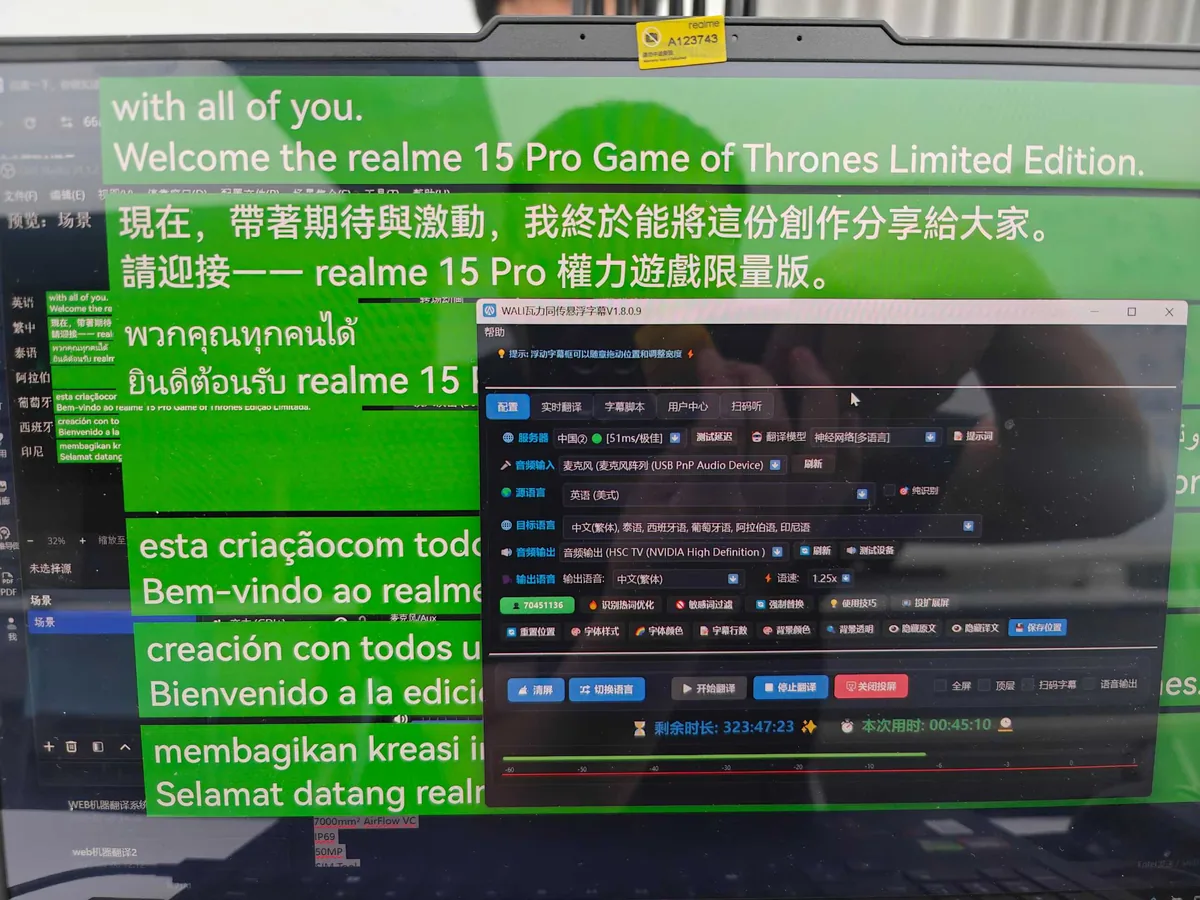
Start with a clean audio feed. WALI connects live transcription, AI translation, approved terminology and operator correction, then delivers the same captions to venue screens, OBS production and audience phones.
Project consultationComplete a one-minute briefSent directly to zoom@fanyi.im- Interpretation Caption SaaS
- Industry terminology
- Translation quality control
- Live operator correction
Please refer to the bilingual captions on the main screen.
请关注会场主屏上的双语字幕。
Every capability described here is backed by shipping software and traceable project records.
CAPTION OPERATIONS SAAS
INTERPRETATION WORKSPACE
Prepare the room once, then bring the same settings into production.
Rooms, languages, provider routes, terminology, caption presentation, accounts and usage are managed in one place. Prepare projects in the browser workspace, then run the live event from the Web or Windows client.
Central room and route configuration
Save source and target languages, recognition and translation routes, caption pacing and delivery settings instead of rebuilding every event.
Project terminology across the language chain
Keep speakers, brands, products and domain terms in one project while preserving the distinct roles of recognition terms, approved translations and replacements.
One caption state for every output
Operator, correction, clean projection, OBS, audience QR and voice output share the same room state instead of maintaining separate copies.
Enterprise accounts and auditable usage
Enterprise main accounts can manage subaccounts and available time, while billing records show how platform functions are consumed.
Run the topology assigned to the accountLocal-direct and online-platform rooms share one management and delivery experience while retaining different audio-processing routes.
TRANSLATION QUALITY
TERMINOLOGY CONTROL
Accuracy is not a slogan.It is a workflow that can be prepared, monitored and corrected.
Live translation is affected by audio, accent, context and specialist language. WALI brings industry instructions, recognition terms, approved translations, deterministic replacements and human review into one caption workflow to reduce predictable, manageable errors.
Start with a reliable source transcript
Check levels, noise and source language, then apply names, brands, models and abbreviations as recognition terms before translation begins.
Give the model the right domain context
Select a concise industry instruction for manufacturing, finance, medicine, AI, energy and other domains, preserving figures, units and non-expansion boundaries.
Keep critical terms in one approved form
Only terms matched in the current speech are added to translation context, then applied for the actual target language to reduce drift during long events.
Keep critical facts open to correction
Operators can correct names, amounts, dates and key statements in real time, while deterministic errors are handled by explicit replacement rules.
HOW IT WORKS
Audio comes in. Clear captions reach every screen that needs them.
Audio ingest, live recognition, machine translation, operator correction and caption delivery are managed in one workflow for consistent monitoring and control.
Audio ingest and quality check
Connect the mixing console, conference microphones, computer audio or a remote meeting feed, then verify levels, noise and network readiness.
Live transcription and terminology
Generate source captions continuously while applying prepared speaker names, brands and specialist terminology for the event.
Translation and operator correction
Produce translated captions for the configured language direction, with live monitoring and correction for critical information.
Synchronized multi-channel delivery
Publish one managed caption stream to venue displays, production systems, web viewers and audience devices.
One workflow for recognition, translation and deliveryLess tool switching for the production team, consistent content for every viewer.
CORE CAPABILITIES
Live production needs more than a caption overlay.
Terminology, caption presentation, operator controls and delivery channels work together to support accurate presentation and reliable event delivery.
One caption source across every output
Source and translated captions are published from a single managed stream to venue, broadcast and audience endpoints.
Continuous captions for live speech
Designed for keynotes, panel discussions, corporate training and audience Q&A, with source and translated text delivered in real time.
Event-specific terminology
Prepare company names, products, speakers and domain terminology from agendas, scripts and presentation materials.
Centralized recognition, translation and output control
Operators can monitor service status, correct critical text, configure source and translation styles, and manage separate output channels.
- Operator correction for key captions
- Separate source and translation styles
- Independent venue and audience outputs
REAL-TIME MULTILINGUAL CALLS
Multilingual audio and video calls that keep global work moving.
Enterprise users start an audio or video call from Android and select the language pair required by the conversation. Invited guests join from Android or a browser, while one consistent source-and-translation caption stream is shared across the room.
Language routing for each project
Select source and target languages for the business context. Chinese-English supports continuous automatic direction; other combinations follow the selected language pair and available speech capability.
Shared source and translation for every participant
The room maintains one authoritative caption feed, keeping hosts and invited participants aligned without repeated explanations.
Browser access with no pre-installation
External guests open an invitation link, grant microphone or camera permission, and join from a browser when appropriate.
Separate handling for captions and media
Captions may be retained for business needs, while audio and video are used for live transmission and are not stored as complete recordings by default.
中文 ⇄ English · Captions connected
AI DESKTOP WORKFLOWS
From live meetings to finished content.Two Windows production workflows.
AI Cloud Notes turns long meetings into searchable, editable formal records. AI Voice Studio turns approved scripts into directed, reviewable and versioned audio.
AI Cloud Notes
Direct speech recognition, live interim text, speaker diarization and naming, terminology, correction, article-style formal transcripts, document review and meeting minutes.
AI Voice Studio
Cast a neural voice, direct emotion, pace and pauses by scene and paragraph, edit SSML, preview the work and keep every generated audio version available for download.
PRODUCTS & SERVICES
One enterprise language workflow for live, remote and content operations.
Select software capabilities or managed delivery according to whether the content is live, how audio enters the system, where captions must appear and what level of operational support is required.
AI Cloud Notes
Capture meeting audio on Windows, identify speakers in real time and develop the transcript into an editable, searchable and exportable formal record.
- Speaker diarization
- Live correction
- Minutes and DOCX
Caption SaaS and managed event service
Manage rooms, languages, terminology, correction and delivery in one workspace, with rehearsal and onsite support available for managed projects.
- Room management
- Translated captions
- Multi-channel delivery
Broadcast and production captions
A clean, control-free caption source for production systems or streaming software to place source and translated text in the program frame.
- Clean caption source
- Visual configuration
- Production integration
Audience captions and translated audio
Audience members use a QR code or link to read live captions—and, when configured, listen to AI-generated translated audio.
- No-install access
- Live captions
- AI voice output
Multilingual audio & video calls
Select a language pair, start from Android, invite Android or browser guests, and share the same live source and translated captions.
- Multilingual translation
- Shared captions
- Browser guests
Dual-screen translation terminals
Independent displays for each speaker in reception, exhibitions, hospitality desks and service counters.
- Dual displays
- Two-way voice translation
- Scenario customization
Text, image and offline translation
Translate typed content and images, with offline recognition and translation available on compatible devices for mobile and limited-connectivity use.
- Text translation
- Image translation
- Offline capability
AI Voice Studio and SSML
Direct voice, emotion, pace and pauses by scene and paragraph, then retain every generated version and download approved audio.
- AI voice direction
- SSML control
- Preview version history
Media transcription and subtitling
Transcribe, translate, review and format existing audio or video, with multilingual subtitle files and captioned video available for publishing.
- Media transcription
- Subtitle files
- Captioned video
Enterprise customization and integration
Configure branded interfaces, language workflows, caption endpoints, account permissions and integration with existing business systems.
- Brand and UI
- Endpoint fit
- API and workflow integration
TRUST BY DESIGN
Professional delivery begins with preparation and live control.
Meeting language services depend on content, production audio, networks, display systems, broadcast workflows and onsite personnel. Each managed project defines these responsibilities and validates the critical route before the event.
Pre-event materials and terminology
Use agendas, slides, scripts and speaker information to prepare recognition terms, translation terminology and replacement rules.
Create a language asset specific to the eventAudience access and endpoint planning
Define caption layouts and access for venue displays, broadcast frames, web viewers and audience devices.
Match the output to the way people actually attendLive monitoring and correction
Operators monitor recognition, translation and output status, correcting speaker names, figures and critical statements where required.
Combine automation efficiency with human controlEnd-to-end rehearsal and fallback
Validate production audio, networks, displays, broadcast output and audience access using the actual event route.
Verify every critical interface before the eventCapability boundaries, data handling and support scope are agreed before delivery.
- Recognition and translation are evaluated against the actual audio, languages and specialist content
- Project scope, language directions, equipment and support model are agreed in advance
- Call media is live by default, not retained as a complete recording
- Caption data and enterprise terminology are managed under permissions and project terms
USE CASES
Configure the solution around the meeting format, audio route and viewing endpoints.
In-person meetings, broadcasts, hybrid events and remote calls have different requirements for audio, caption delivery and operational support.
International conferences
Live transcription and translated captions for keynotes, panels and Q&A, delivered to the main screen and audience viewers.
Broadcast events and product launches
A clean caption source enters the production workflow while venue and mobile endpoints remain synchronized.
Corporate training
Onsite and remote learners follow the same content, supported by product and course terminology prepared in advance.
Cross-border meetings and technical support
Shared source and translated captions across configured language pairs for product demonstrations, project coordination, technical support and distributed teamwork.
Reception and service counters
Use continuous meeting captions, dual-screen terminals or face-to-face translation according to the interaction.
FIELD RECORDS
PROJECT CASES
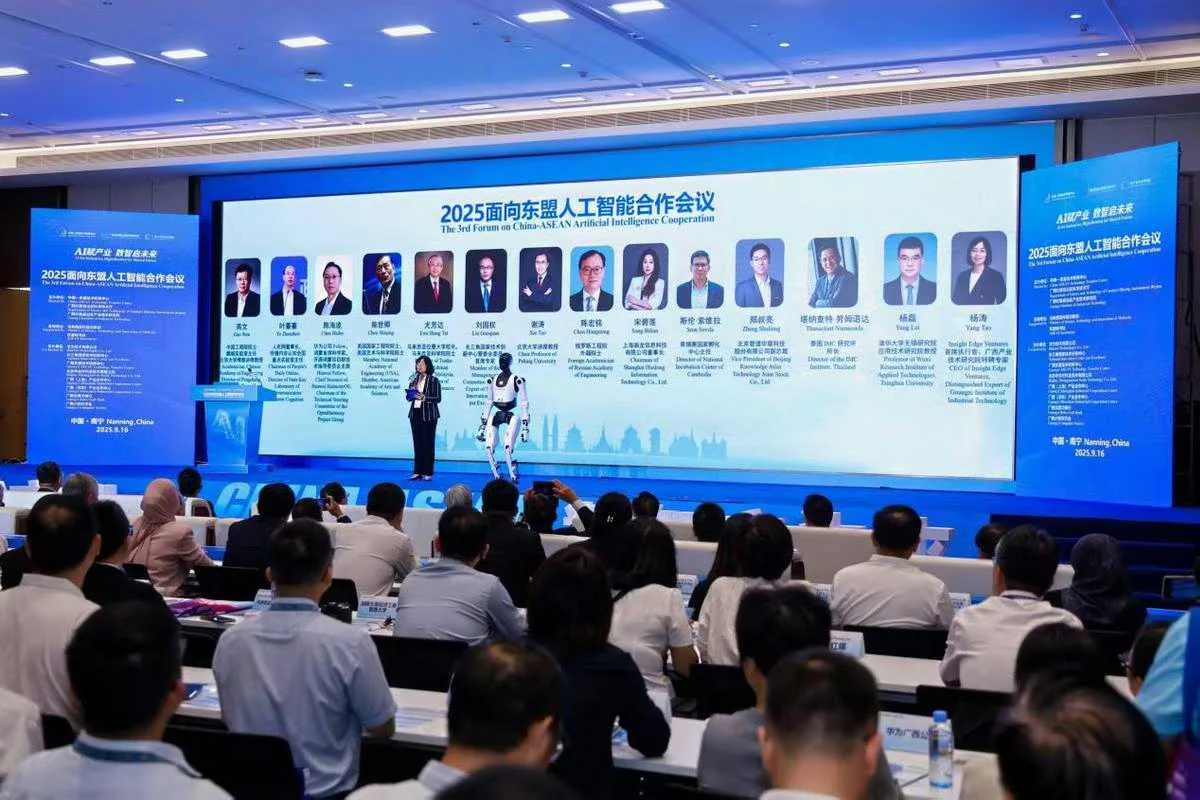
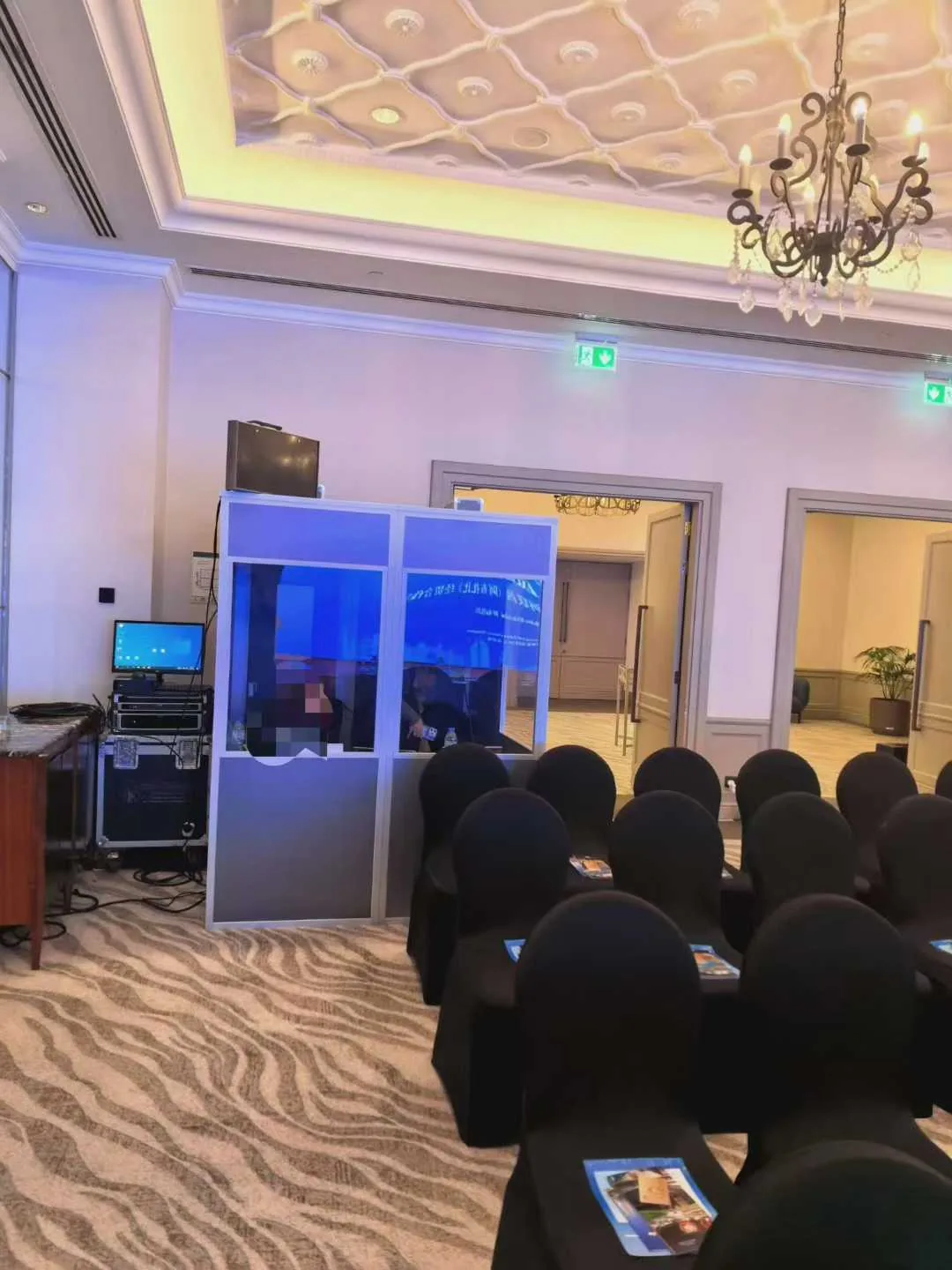
Different venues bring different constraints—and different answers.
Our records cover multilingual conferences, global product launches, industry forums and overseas business events, with emphasis on language configuration, output endpoints and delivery method.
PRACTICAL GUIDES
INSIGHTS
Lessons from live production,written for the next project.
GUIDE 01 / LIVE EVENTHow captions reach venue screens, broadcasts and audience devices
Plan production audio, terminology, live correction, clean broadcast output and QR-code mobile access.
Read the implementation guide
GUIDE 02 / REMOTE CALLHow multilingual video calls provide shared translated captions
Understand browser joining, language-pair routing and the right cross-border business use cases.
Read the selection guide
GUIDE 03 / CONTENTHow AI voice and TTS fit multilingual content production
Build a repeatable workflow from scripts and translation to pronunciation, review, subtitles and delivery files.
Read the production guidePROJECT SUPPORT
Think through the details before show day.
Production events connect audio, networks, displays, broadcast systems, audience access and onsite personnel. We assess the requirements, configure terminology and caption presentation, validate the equipment route and provide the agreed level of operational support.
Requirements and solution assessment
Confirm the event format, language directions, scale, audio source, caption endpoints, network and support model.
Terminology and visual configuration
Prepare event terminology and define the source-and-translation layout, branding, type size and display treatment.
Production-route rehearsal
Validate audio, recognition and translation, venue displays, broadcast output, audience devices and agreed fallback paths.
Live operation and project review
Provide remote or onsite technical support as agreed, then organize caption files and operational records after the event.
FAQ
Key questions before procurement and implementation.
What does the interpretation caption SaaS manage?
Enterprise and event teams can create and manage caption rooms, configure languages, recognition and translation routes, project terminology and caption presentation, then deliver one room to the operator, correction view, venue projection, clean OBS source and audience QR page. Each room uses the local-direct or online-platform topology assigned to the account.
How do live interpretation captions differ from post-produced subtitles?
Post-produced subtitles are created after recording. Live interpretation captions process speech as it happens and must account for production audio, recognition and translation latency, terminology, operator correction and delivery to venue, broadcast and audience endpoints.
How are captions integrated with venue displays and broadcast production?
Venue displays can use a dedicated projection view, while production teams receive a clean output without operator controls. Source-and-translation layout, type size, colour, background and brand elements can be configured for the stage and production frame.
Does the audience need to install an application?
Usually not. Audience members can scan a QR code or open a project link in a mobile or desktop browser. When AI voice output is included, it can also be delivered through the configured audience experience.
How are speaker names, brands and specialist terms handled?
Agendas, slides, scripts and speaker information can be used to prepare a project lexicon. Recognition terms improve source transcription, translation terms constrain the target form, and replacement rules handle deterministic spelling. WALI also provides 27 industry and specialist templates, which can be combined with event material and human review.
How does a multilingual audio or video call work?
An enterprise user starts the call from Android and selects a source and target language. Participants join through Android or a browser invite and share one source-and-translation stream. Chinese-English supports continuous automatic language direction; other combinations and auto-detection behaviour follow the selected language pair and available speech capability.
What affects recognition and translation quality?
Results depend on audio quality, accents, speaking speed, venue noise, languages and specialist content. Managed projects reduce risk through audio checks, terminology preparation, replacement rules, operator correction and rehearsal. Legal, medical, financial and other high-risk content may require human review or professional interpreters.
What should be prepared before a production event?
Provide the agenda, speaker list, slides or scripts, language directions, venue plan and technical information. Confirm mixing-console audio, network access, display endpoints, broadcast integration and operators, then rehearse the complete route with production equipment.
How are call media, captions and project data handled?
Call media is used for live transmission and is not retained as a complete long-term recording by default. Captions, settlement and necessary audit information are handled according to business and compliance needs. Access to terminology, captions and project material is controlled under the applicable terms, privacy policy and project agreement.
When should we use the software directly or request managed delivery?
Routine internal meetings or teams with their own operators can begin with the client software. Large venues, broadcast integration, multilingual launches, branded visuals, specialist terminology or onsite support should be assessed as a managed project.
PROJECT INQUIRY
Talk to the project team
Tell us what the venue looks like. We will help shape the right setup.
Include the event type, date and location, language directions, audience size, production audio and caption endpoints. The project team will assess software configuration, technical delivery, equipment integration and customization scope.
PLAN THE COMPLETE LANGUAGE WORKFLOW
Plan the right language service
for your next meeting or event.
From event format, language directions and audience scale to audio integration, caption endpoints and technical support, the project team will recommend an implementation based on the actual production environment.